
Detailed simulation setup#
by Kaustub Anand and David A. Minton
Here, we will walk you through the basic features of Swiftest and using them in Python.
This is based on swiftest/examples/Basic_Simulation.
Start with importing Swiftest and other packages we will use in this tutorial.
In [1]: import swiftest

In [2]: import numpy as np
Initial Simulation Setup#
Create a Swiftest Simulation object and clean the simulation directory of any previous Swiftest objects, if any.
Outputs are stored in the ./simdata directory by default.
In [3]: sim = swiftest.Simulation()
Reading Swiftest file /home/docs/checkouts/readthedocs.org/user_builds/swiftest/checkouts/latest/docs/simdata/param.in
codename                         Swiftest
gmtiny                           0.0 DU^3 / TU^2
mtiny                            0.0 MU
t0                               0.0 TU
tstart                           0.0 TU
istep_out                        1
dump_cadence                     1
init_cond_file_name              init_cond.nc
init_cond_file_type              NETCDF_DOUBLE
init_cond_format                 XV
output_file_type                 NETCDF_DOUBLE
output_file_name                 data.nc
output_format                    XVEL
restart                          REPLACE
rmin                             0.004650467260962157 DU
rmax                             10000.0 DU
qmin_coord                       HELIO
close_encounter_check            True
rhill_present                    False
extra_force                      False
general_relativity               True
collision_model                  FRAGGLE
minimum_fragment_gmass           0.0 DU^3 / TU^2
minimum_fragment_mass            0.0 MU
minimum_fragment_gmass           0.0 DU^3 / TU^2
minimum_fragment_mass            0.0 MU
nfrag_reduction                  30.0
rotation                         True
compute_conservation_values      True
interaction_loops                TRIANGULAR
encounter_check_loops            TRIANGULAR
encounter_save                   NONE
codename                         Swiftest
An optional argument can be passed to specify the simulation directory
sim = swiftest.Simulation(simdir='/path/to/simdata')
The argument to simdir can either be a relative path or an absolute path. Now that we have a simulation object set up (with default parameters), we can add bodies to the simulation. The most massive body in the simulation is taken as the central body.
Solar System Bodies#
We can add solar system bodies to the simulation using the add_solar_system_body method.
This method uses JPL Horizons to extract the parameters of a particular body given a name.
# Add the modern planets and the Sun using the JPL Horizons Database.
In [4]: sim.add_solar_system_body(["Sun","Mercury","Venus","Earth","Mars","Jupiter","Saturn","Uranus","Neptune"])
Adding solar system bodies by name: Sun, Mercury, Venus, Earth, Mars, Jupiter, Saturn, Uranus, Neptune
Creating the Sun as a central body
Fetching ephemerides data for Mercury from JPL/Horizons
Found matching body: Mercury Barycenter (1)
    Alternate matching bodies:
    Mercury (199)
Found ephemerides data for Mercury Barycenter (1) from JPL/Horizons
Physical properties found for Mercury Barycenter (199)
Fetching ephemerides data for Venus from JPL/Horizons
Found matching body: Venus Barycenter (2)
    Alternate matching bodies:
    Venus (299)
Found ephemerides data for Venus Barycenter (2) from JPL/Horizons
Physical properties found for Venus Barycenter (299)
Fetching ephemerides data for Earth from JPL/Horizons
Found matching body: Earth-Moon Barycenter (3)
    Alternate matching bodies:
    Earth (399)
Found ephemerides data for Earth-Moon Barycenter (3) from JPL/Horizons
Found matching body: Earth (399) (399)
Physical properties found for Earth (399)
Combining mass of Earth and the Moon
Found matching body: Moon (301) (301)
Physical properties found for Moon (301)
Fetching ephemerides data for Mars from JPL/Horizons
Found matching body: Mars Barycenter (4)
    Alternate matching bodies:
    Mars (499)
Found ephemerides data for Mars Barycenter (4) from JPL/Horizons
Found matching body: Mars (499) (499)
Physical properties found for Mars (499)
Fetching ephemerides data for Jupiter from JPL/Horizons
Found matching body: Jupiter Barycenter (5)
    Alternate matching bodies:
    Jupiter (599)
Found ephemerides data for Jupiter Barycenter (5) from JPL/Horizons
Found matching body: Jupiter (599) (599)
Physical properties found for Jupiter (599)
Fetching ephemerides data for Saturn from JPL/Horizons
Found matching body: Saturn Barycenter (6)
    Alternate matching bodies:
    Saturn (699)
Found ephemerides data for Saturn Barycenter (6) from JPL/Horizons
Found matching body: Saturn (699) (699)
Physical properties found for Saturn (699)
Fetching ephemerides data for Uranus from JPL/Horizons
Found matching body: Uranus Barycenter (7)
    Alternate matching bodies:
    Uranus (799)
Found ephemerides data for Uranus Barycenter (7) from JPL/Horizons
Found matching body: Uranus (799) (799)
Physical properties found for Uranus (799)
Fetching ephemerides data for Neptune from JPL/Horizons
Found matching body: Neptune Barycenter (8)
    Alternate matching bodies:
    Neptune (899)
Found ephemerides data for Neptune Barycenter (8) from JPL/Horizons
Found matching body: Neptune (899) (899)
Physical properties found for Neptune (899)
rmin                             0.004650467260962157 DU
Writing initial conditions to file /tmp/tmp1ainr8xi/init_cond.nc
Writing parameter inputs to file /tmp/tmp1ainr8xi/param.in
We can add other small bodies too.
# Add in some main belt asteroids
In [5]: sim.add_solar_system_body(name=["Ceres","Vesta","Pallas","Hygiea"],id_type="smallbody")
Adding solar system bodies by name: Ceres, Vesta, Pallas, Hygiea
Fetching ephemerides data for Ceres from JPL/Horizons
Found matching body: 1 Ceres (A801 AA) (Ceres)
Found ephemerides data for 1 Ceres (A801 AA) (Ceres) from JPL/Horizons
Physical properties found for 1 Ceres (A801 AA)
Fetching ephemerides data for Vesta from JPL/Horizons
Found matching body: 4 Vesta (A807 FA) (Vesta)
Found ephemerides data for 4 Vesta (A807 FA) (Vesta) from JPL/Horizons
Physical properties found for 4 Vesta (A807 FA)
Fetching ephemerides data for Pallas from JPL/Horizons
Found matching body: 2 Pallas (A802 FA) (Pallas)
Found ephemerides data for 2 Pallas (A802 FA) (Pallas) from JPL/Horizons
Physical properties found for 2 Pallas (A802 FA)
Fetching ephemerides data for Hygiea from JPL/Horizons
Found matching body: 10 Hygiea (A849 GA) (Hygiea)
Found ephemerides data for 10 Hygiea (A849 GA) (Hygiea) from JPL/Horizons
Physical properties found for 10 Hygiea (A849 GA)
rmin                             0.004650467260962157 DU
Writing initial conditions to file /tmp/tmp1ainr8xi/init_cond.nc
Writing parameter inputs to file /tmp/tmp1ainr8xi/param.in

# Add in some big KBOs
In [6]: sim.add_solar_system_body(name=["Pluto","Eris","Haumea","Quaoar"])
Adding solar system bodies by name: Pluto, Eris, Haumea, Quaoar
Fetching ephemerides data for Pluto from JPL/Horizons
Found matching body: Pluto Barycenter (9)
    Alternate matching bodies:
    Pluto (999)
Found ephemerides data for Pluto Barycenter (9) from JPL/Horizons
Found matching body: Pluto (999) (999)
Physical properties found for Pluto (999)
Combining mass of Pluto and Charon
Found matching body: Charon (901) (901)
Physical properties found for Charon (901)
Fetching ephemerides data for Eris from JPL/Horizons
Found matching body: Eris (system barycenter) (20136199)
    Alternate matching bodies:
    Eris (primary body) (920136199)
    Dysnomia (120136199)
Found ephemerides data for Eris (system barycenter) (20136199) from JPL/Horizons
Found matching body: Eris (primary body) (920136199) (920136199)
Physical properties found for Eris (primary body) (920136199)
Fetching ephemerides data for Haumea from JPL/Horizons
Found matching body: Haumea (system barycenter) (20136108)
    Alternate matching bodies:
    Haumea (primary body) (920136108)
    Hi'iaka (120136108)
    Namaka (220136108)
Found ephemerides data for Haumea (system barycenter) (20136108) from JPL/Horizons
Found matching body: Haumea (primary body) (920136108 (920136108)
Physical properties found for Haumea (primary body) (920136108
Fetching ephemerides data for Quaoar from JPL/Horizons
Found matching body: Quaoar (system barycenter) (20050000)
    Alternate matching bodies:
    Quaoar (primary body) (920050000)
    Weywot (120050000)
Found ephemerides data for Quaoar (system barycenter) (20050000) from JPL/Horizons
Found matching body: Quaoar (primary body) (920050000 (920050000)
Physical properties found for Quaoar (primary body) (920050000
rmin                             0.004650467260962157 DU
Writing initial conditions to file /tmp/tmp1ainr8xi/init_cond.nc
Writing parameter inputs to file /tmp/tmp1ainr8xi/param.in

# Add in some Centaurs
In [7]: sim.add_solar_system_body(name=["Chiron","Chariklo"])
Adding solar system bodies by name: Chiron, Chariklo
Fetching ephemerides data for Chiron from JPL/Horizons
Found matching body: 2060 Chiron (1977 UB) (Chiron)
Found ephemerides data for 2060 Chiron (1977 UB) (Chiron) from JPL/Horizons
Physical properties found for 2060 Chiron (1977 UB)
Fetching ephemerides data for Chariklo from JPL/Horizons
Found matching body: 10199 Chariklo (1997 CU26) (Chariklo)
Found ephemerides data for 10199 Chariklo (1997 CU26) (Chariklo) from JPL/Horizons
Physical properties found for 10199 Chariklo (1997 CU26)
rmin                             0.004650467260962157 DU
Writing initial conditions to file /tmp/tmp1ainr8xi/init_cond.nc
Writing parameter inputs to file /tmp/tmp1ainr8xi/param.in
Note
The add_solar_system_body method is designed for ease of use. If you pass the name argument alone, it will make a “best guess” as to which body to retrieve, using the astroquery.jplhorizons module. If you want more control over which body to pass to JPL Horizons, you can supply the optional argument ephemeris_id in addition to name. The string argument passed to name is then used internally by Swiftest to identify the body, but the query to JPL Horizons is made with ephemeris_id. Therefore the following two calls are equivalent
sim.add_solar_system_body(name="Sun")
sim.add_solar_system_body(name="Sun", ephemeris_id="0")
Note
The arguments name=”Earth” and name=”Pluto” are handled as special cases in add_solar_system_body due to their unusually massive satellites. When “Earth” (or “Pluto”) is requested, then the mass the Moon (Charon) is added to the body mass and the initial conditions are set to the Earth-Moon (Pluto-Charon) barycenter. If you wish to instead request the planet directly, you should pass ephemeris_id instead.
User-defined bodies#
You can add a user-defined body with arbitrary initial conditions using using sim.add_body. This method contains a number of optional arguments, and different combinations of arguments can result in different kinds of bodies.
id: This is a unique, positive integer id for the body. Usually you would not pass this argument, as an id will be automatically assigned in the order in which it was added, and the central body is always assigned to be id 0.
name: This is a unique, string name for the body. If you do not pass this, then the name will be set to “Body{id}”
rh,vh: These are the position and velocity vectors of the body in Cartesian coordinates. These are used to set the initial conditions for the body when the Simulation is set to init_cond_format=”XV” (or the equivalent param[“IN_FORM”] = “XV”).
a,e,inc,capom,omega,capm: These are used to set the initial osculating orbital elements for the body when the Simulation is set to init_cond_format=”EL” (or the equivalent param[“IN_FORM”] = “EL”).
We will randomize the initial conditions and therefore import the numpy.random module.
In [8]: from numpy.random import default_rng

In [9]: rng = default_rng(seed=123)
Starting with massive bodies:
In [10]: npl = 5 # number of massive bodies

In [11]: density_pl  = 3000.0 / (sim.param['MU2KG'] / sim.param['DU2M'] ** 3)

In [12]: name_pl     = ["SemiBody_01", "SemiBody_02", "SemiBody_03", "SemiBody_04", "SemiBody_05"]

In [13]: M_pl        = np.array([6e20, 8e20, 1e21, 3e21, 5e21]) * sim.KG2MU # mass in simulation units

In [14]: R_pl        = np.full(npl, (3 * M_pl/ (4 * np.pi * density_pl)) ** (1.0 / 3.0)) # radius

In [15]: Ip_pl       = np.full((npl,3),0.4,) # moment of inertia

In [16]: rot_pl      = np.zeros((npl,3)) # initial rotation vector in degrees/TU

In [17]: mtiny       = 1.1 * np.max(M_pl) # threshold mass for semi-interacting bodies in SyMBA.
Depending on the simulation parameters, we can add bodies with Orbital Elements or Cartesian Coordinates.
Orbital Elements#
Initialize orbital elements and then add the bodies.
In [18]: a_pl        = rng.uniform(0.3, 1.5, npl) # semi-major axis

In [19]: e_pl        = rng.uniform(0.0, 0.2, npl) # eccentricity

In [20]: inc_pl      = rng.uniform(0.0, 10, npl) # inclination (degrees)

In [21]: capom_pl    = rng.uniform(0.0, 360.0, npl) # longitude of the ascending node

In [22]: omega_pl    = rng.uniform(0.0, 360.0, npl) # argument of periapsis

In [23]: capm_pl     = rng.uniform(0.0, 360.0, npl) # mean anomaly

In [24]: sim.add_body(name=name_pl, a=a_pl, e=e_pl, inc=inc_pl, capom=capom_pl, omega=omega_pl, capm=capm_pl, mass=M_pl, radius=R_pl,  Ip=Ip_pl, rot=rot_pl)
Adding bodies: SemiBody_01, SemiBody_02, SemiBody_03, SemiBody_04, SemiBody_05
rmin                             0.004650467260962157 DU
Writing initial conditions to file /tmp/tmp1ainr8xi/init_cond.nc
Writing parameter inputs to file /tmp/tmp1ainr8xi/param.in
Cartesian Coordinates#
The process is similar for adding bodies with cartesian coordinates. However, the parameter init_cond_format must be set to XV before adding the bodies. The process of setting parameters is explained in the next section. Start by defining the position and velocity vectors. Here we define the orbital velocities and scale them by a random value.
# position vectors
rh_pl = rng.uniform(-5, 5, (npl,3))
rh_pl_mag = np.linalg.norm(rh_pl, axis=1) # magnitudes of the position vector

# General velocity vectors

# define the magnitudes
velocity_scale = rng.uniform(0.5, 1.5, npl) # scale the orbital velocity
vh_pl_mag = velocity_scale * np.sqrt(sim.GU * M_pl / rh_pl_mag) # magnitude of the velocity vector

# initialize the vectors using the position vectors
vx = rh_pl.T[0] * vh_pl_mag / rh_pl_mag
vy = rh_pl.T[1] * vh_pl_mag / rh_pl_mag
vz = rh_pl.T[2] * vh_pl_mag / rh_pl_mag

# rotate the velocity vectors to the XY plane for orbital motion
vh_pl = np.array([vx, vy, vz]).T
vh_pl = np.cross(vh_pl, np.array([0,0,1])) # velocity vectors

sim.add_body(name=name_pl, rh=rh_pl, vh=vh_pl, mass=M_pl, radius=R_pl,  Ip=Ip_pl, rot=rot_pl)
The process is similar for test particles. They only need the orbital elements or the cartesian coordinates. Here is an example with orbital elements:
# Add 10 user-defined test particles.
In [25]: ntp = 10

In [26]: name_tp     = ["TestParticle_01", "TestParticle_02", "TestParticle_03", "TestParticle_04", "TestParticle_05", "TestParticle_06", "TestParticle_07", "TestParticle_08", "TestParticle_09", "TestParticle_10"]

In [27]: a_tp        = rng.uniform(0.3, 1.5, ntp)

In [28]: e_tp        = rng.uniform(0.0, 0.2, ntp)

In [29]: inc_tp      = rng.uniform(0.0, 10, ntp)

In [30]: capom_tp    = rng.uniform(0.0, 360.0, ntp)

In [31]: omega_tp    = rng.uniform(0.0, 360.0, ntp)

In [32]: capm_tp     = rng.uniform(0.0, 360.0, ntp)

In [33]: sim.add_body(name=name_tp, a=a_tp, e=e_tp, inc=inc_tp, capom=capom_tp, omega=omega_tp, capm=capm_tp)
Adding bodies: TestParticle_01, TestParticle_02, TestParticle_03, TestParticle_04, TestParticle_05, TestParticle_06, TestParticle_07, TestParticle_08, TestParticle_09, TestParticle_10
rmin                             0.004650467260962157 DU
Writing initial conditions to file /tmp/tmp1ainr8xi/init_cond.nc
Writing parameter inputs to file /tmp/tmp1ainr8xi/param.in
Customising Simulation Parameters#
Now that we have added the bodies, we can set the simulation parameters. tstop and dt need to be set before running the simulation.
This can be done in multiple ways:
When creating the initial Swiftest simulation object
sim = swiftest.Simulation(integrator = 'symba', tstart=0.0, tstop=1.0e3, dt=0.01,
                            tstep_out=1.0, dump_cadence=0, compute_conservation_values=True, mtiny=mtiny)
sim.set_parameter: Set individual parameters in the simulation. The user can set one or multiple at a time.
In [34]: sim.set_parameter(tstart=0.0, tstop=1.0e3, dt=0.01, tstep_out=1.0, dump_cadence=0, compute_conservation_values=True, mtiny=mtiny)
codename                         Swiftest
gmtiny                           1.0919433586029914e-07 DU^3 / TU^2
mtiny                            2.766029318728523e-09 MU
tstart                           0.0 TU
tstop                            1000.0 TU
dt                               0.01 TU
istep_out                        100
dump_cadence                     0
tstep_out                        1.0 TU
compute_conservation_values      True
Out[34]:
{'GMTINY': np.longdouble('1.09194335860299138484e-07'),
 'TSTART': 0.0,
 'TSTOP': 1000.0,
 'DT': 0.01,
 'ISTEP_OUT': 100,
 'DUMP_CADENCE': 0,
 'ENERGY': True}

In [35]: sim.set_parameter(rmin = 0.05)
codename                         Swiftest
rmin                             0.05 DU
Out[35]: {'CHK_RMIN': 0.05, 'CHK_QMIN': 0.05, 'CHK_QMIN_RANGE': '0.05 10000.0'}
We now set up the simulation parameters. Here we have a simulation starting from 0.0 y and running for 1 My = 1e6 years with time steps of 0.01 years. The timestep should be less than or equal to 1/20 of the orbital period of the innermost body.
The user can then write the parameters to the param.in file by using write_param.
To see the parameters of the simulation, use sim.get_parameter.
Running the Simulation#
Once everything is set up, we can save the simulation object and then run it.
In [36]: sim.run()
Cleaning up simulation directory /tmp/tmp1ainr8xi of old output files.
Writing initial conditions to file /tmp/tmp1ainr8xi/init_cond.nc
Writing parameter inputs to file /tmp/tmp1ainr8xi/param.in
Writing parameter inputs to file /tmp/tmp1ainr8xi/param.in
Running a Swiftest symba run from tstart=0.0 TU to tstop=1000.0 TU

Run complete.

Creating Dataset from NetCDF file
Successfully converted 1001 output frames.
Swiftest simulation data stored as xarray Dataset .data
Reading initial conditions file as .init_cond

Creating Dataset from NetCDF file
Successfully converted 1 output frames.
Reading collisions history file as .collisions
Finished reading Swiftest dataset files.
Once this is finished, you should be able to access the output data stored in the data attribute.
In [37]: sim.data
Out[37]:
<xarray.SwiftestDataset> Size: 8MB
Dimensions:          (name: 34, time: 1001, space: 3)
Coordinates:
  * name             (name) <U32 4kB 'Sun' 'Mercury' ... 'TestParticle_10'
  * time             (time) float64 8kB 0.0 1.0 2.0 3.0 ... 998.0 999.0 1e+03
  * space            (space) <U1 12B 'x' 'y' 'z'
Data variables:
    id               (name) int64 272B 0 1 2 3 4 5 6 7 ... 27 28 29 30 31 32 33
    status           (time, name) int64 272kB 0 0 0 0 0 0 0 0 ... 0 0 0 0 0 0 0
    npl              (time) int64 8kB 21 21 21 21 21 21 21 ... 21 21 21 21 21 21
    ntp              (time) int64 8kB 12 12 12 12 12 12 12 ... 12 12 12 12 12 12
    nplm             (time) int64 8kB 10 10 10 10 10 10 10 ... 10 10 10 10 10 10
    particle_type    (name) <U32 4kB 'Central Body' ... 'Test Particle'
    rh               (time, name, space) float64 817kB nan nan ... -0.1384
    vh               (time, name, space) float64 817kB nan nan ... 4.855 -0.2402
    gr_pseudo_vh     (time, name, space) float64 817kB nan nan ... 4.855 -0.2402
    a                (time, name) float64 272kB nan 0.3871 ... 0.6574 0.9316
    e                (time, name) float64 272kB nan 0.2056 ... 0.1178 0.09567
    inc              (time, name) float64 272kB nan 7.003 3.394 ... 2.556 8.225
    capom            (time, name) float64 272kB nan 48.3 76.6 ... 131.9 143.3
    omega            (time, name) float64 272kB nan 29.2 54.96 ... 9.973 125.3
    capm             (time, name) float64 272kB nan 338.3 200.5 ... 261.8 124.7
    varpi            (time, name) float64 272kB nan 77.5 131.6 ... 141.9 268.6
    lam              (time, name) float64 272kB nan 55.84 332.0 ... 43.72 33.27
    f                (time, name) float64 272kB nan 327.0 200.2 ... 248.8 133.1
    cape             (time, name) float64 272kB nan 333.0 200.3 ... 255.3 129.0
    Gmass            (time, name) float64 272kB 39.48 6.554e-06 ... 0.0 0.0
    mass             (time, name) float64 272kB 1.0 1.66e-07 ... 0.0 0.0
    rhill            (time, name) float64 272kB nan nan nan nan ... nan nan nan
    radius           (time, name) float64 272kB 0.00465 1.631e-05 ... 0.0 0.0
    origin_time      (name) float64 272B 0.0 0.0 0.0 0.0 0.0 ... 0.0 0.0 0.0 0.0
    origin_type      (name) <U32 4kB 'Initial conditions' ... 'Initial condit...
    origin_rh        (name, space) float64 816B 0.0 0.0 0.0 ... 0.568 -0.1191
    origin_vh        (name, space) float64 816B 0.0 0.0 0.0 ... 5.221 -0.5015
    collision_id     (name) int64 272B 0 0 0 0 0 0 0 0 0 0 ... 0 0 0 0 0 0 0 0 0
    discard_time     (name) float64 272B 1.798e+308 1.798e+308 ... 1.798e+308
    discard_rh       (name, space) float64 816B 0.0 0.0 0.0 0.0 ... 0.0 0.0 0.0
    discard_vh       (name, space) float64 816B 0.0 0.0 0.0 0.0 ... 0.0 0.0 0.0
    discard_body_id  (name) int64 272B -2147483647 -2147483647 ... -2147483647
    Ip               (time, name, space) float64 817kB 0.0 0.0 0.07 ... 0.0 0.0
    rot              (time, name, space) float64 817kB 642.2 -2.221e+03 ... 0.0
    rotphase         (time) float64 8kB 0.0 209.1 58.2 ... 109.1 318.2 167.3
    j2rp2            (time) float64 8kB 4.754e-12 4.754e-12 ... 4.754e-12
    j4rp4            (time) float64 8kB -2.247e-18 -2.247e-18 ... -2.247e-18
    KE_orbit         (time) float64 8kB 0.004229 0.004154 ... 0.004097 0.004218
    KE_rot           (time) float64 8kB 0.007368 0.007368 ... 0.007368 0.007368
    PE               (time) float64 8kB -0.008664 -0.008588 ... -0.008652
    BE               (time) float64 8kB -0.05181 -0.05181 ... -0.05181 -0.05181
    TE               (time) float64 8kB -0.04888 -0.04888 ... -0.04888 -0.04888
    L_orbit          (time, space) float64 24kB 0.0005835 0.0001847 ... 0.0222
    L_rot            (time, space) float64 24kB 1.697e-05 ... 0.0001249
    L_escape         (time, space) float64 24kB 0.0 0.0 0.0 0.0 ... 0.0 0.0 0.0
    E_collisions     (time) float64 8kB 0.0 0.0 0.0 0.0 0.0 ... 0.0 0.0 0.0 0.0
    E_untracked      (time) float64 8kB 0.0 0.0 0.0 0.0 0.0 ... 0.0 0.0 0.0 0.0
    GMescape         (time) float64 8kB 0.0 0.0 0.0 0.0 0.0 ... 0.0 0.0 0.0 0.0
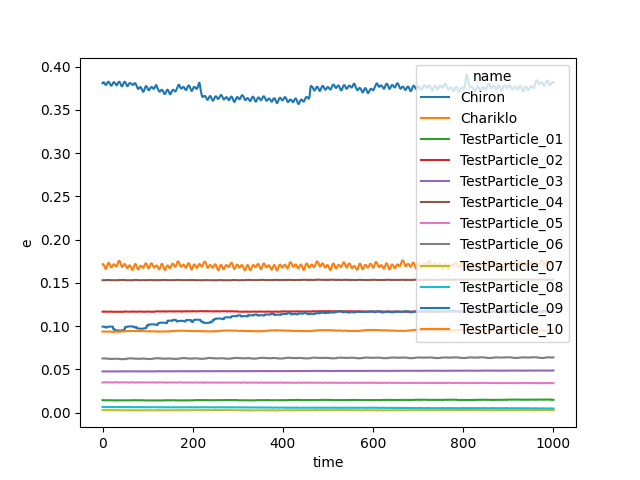
Or, say, plot the eccentricity history of just the test particles:
In [38]: sim.data['e'].where(sim.data.particle_type == 'Test Particle',drop=True).plot(x='time',hue='name');
Modifying and Removing Bodies#
Modifying the properties of initial conditions bodies and removing them is easily done with modify_body() and remove_body(). Any property (other than name, which is the unique identifier) can be modified.
sim.modify_body(name="TestParticle_01", a=1.0, e=0.1, inc=0.0, capom=0.0, omega=0.0, capm=0.0)
Removing bodies is also straightforward:
sim.remove_body(name="TestParticle_02")
You can also alter the central body. For instance, if you wanted to use a set of coefficients from the SHTOOLS library <https://shtools.github.io/SHTOOLS/>, you could do the following.
import swiftest
import pyshtools as pysh

sim = swiftest.Simulation()
c_lm = pysh.datasets.Mars.GMM3(lmax = 6).coeffs
sim.add_solar_system_body(["Mars","Phobos","Deimos"])
sim.modify_body(name="Mars", c_lm=c_lm)